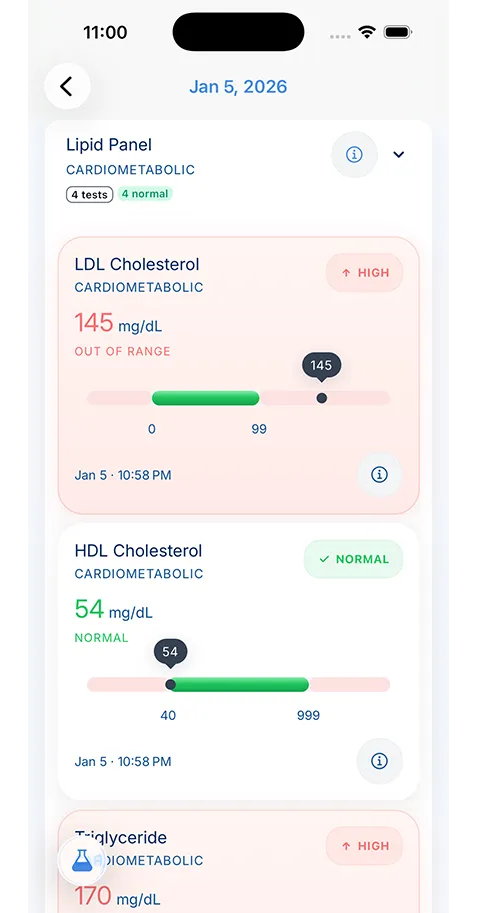
It means the main copy of your health data stays on your phone or tablet rather than being stored by default on the app company's servers.
- Health Data Privacy
- Healthcare Technology
Why On-Device Storage Matters for Health Data
Storage design is a privacy decision, not a minor technical detail. This guide explains why keeping health records on your device can matter, what tradeoffs come with it, and what questions to ask before you trust any app.

Medically reviewed by
Board-Certified Clinical Informatics Physician
Updated on April 02, 2026
Key takeaways
- On-device health data storage keeps your records on your phone or tablet instead of placing the main copy on a company server by default.
- Health information deserves a stricter privacy model because diagnoses, prescriptions, reproductive history, mental health details, and family records can expose far more than a generic file.
- Cloud access can be useful, but patients should understand who holds the data, what permissions the app requests, and how backup or sync works before trusting an app.
- The safest setup is the one you understand: where the data lives, who can read it, what happens after device loss, and how exports or deletion work.
Why Storage Design Matters More for Health Data
People often choose apps based on convenience, design, or the first feature that solves an immediate problem. With health apps, storage deserves more attention than it usually gets. Where your information lives affects who can access it, what can be shared, how breaches can happen, and what control you still have when the company changes course.
That matters because health records reveal more than one medical event. They can expose chronic conditions, prescriptions, reproductive history, mental health care, hospital stays, family details, substance use treatment, and the names of clinicians you see. A health record often tells a fuller story about your life than a bank statement or shopping history.
This is why on-device health data storage matters. The main idea is simple. Instead of sending the working copy of your record to a company server by default, the data stays on your phone or tablet. You still need to think about backup, exports, and device loss, but the first privacy question changes in an important way. If the company does not store your record by default, there is much less for the company to read, share, misconfigure, or expose.
On-Device Versus Cloud Is a Real Tradeoff
Cloud storage offers clear advantages. It can make sync easier across devices. It can help if you replace a phone. It can support collaboration when a family or care team needs shared access. Those benefits are real.
The problem is that cloud convenience can hide a larger trust decision. If the company stores your health data, you now depend on its security model, account protections, employee access controls, data-sharing rules, and long-term business choices. You also depend on how clearly that company explains its privacy practices.
The Federal Trade Commission has warned consumers that some health apps collect sensitive information and may not be covered by HIPAA in the same way people expect from hospitals or doctors. That gap matters. Many patients assume “health app” means “health privacy law handles this for me.” It often does not.
On-device storage does not remove all risk, but it changes the shape of the risk. A lost phone becomes a serious concern. Weak device security becomes a bigger issue. Your backup strategy matters more. At the same time, mass server-side exposure becomes less central because the company is not holding the main copy of your record in the same way.
Health Records Need a Stricter Privacy Standard
Patients often hear marketing language about security that sounds impressive but reveals very little. Health records deserve more than broad claims.
A privacy-first model should answer plain questions. Who can read the data. Is the information stored locally or uploaded by default. What permissions does the app request. Can the company use the data for analytics, advertising, or research. What happens if the company is sold. Can you export your record in a usable format. Can you delete it without guessing what remains on a server.
Those questions matter for any app, but they matter more for health records because the stakes stay with you for years. A fitness preference from last month is one thing. A pregnancy history, psychiatric medication list, or old imaging report is different. The same goes for family records. If you manage records for children, parents, or a spouse, your storage decision affects more than one person.
That is why patients who care about protect health data privacy should treat storage as a first-order decision, not a technical footnote.
Local Storage Helps When Access and Privacy Need to Coexist
One common argument for cloud-first systems is that privacy and access pull in opposite directions. In practice, patients need both. They need privacy because the records are sensitive. They need access because the records must be usable during appointments, while traveling, or in the hours after a hospital discharge.
Local storage supports that balance in an important way. If your record stays on your device, you can still review it without depending on an internet connection. That matters when you are in a clinic with poor reception, at a relative’s house trying to locate a medication list, or preparing for a visit in a parking garage where the portal will not load.
This is one reason “offline health records” is not just a convenience phrase. It can be a real patient need. The point is not to reject every form of sync or backup. The point is to keep the record usable without making constant server access the center of the experience.
Backup and Export Questions Matter Just as Much
Patients who hear “store medical records locally” often ask the same fair question: what happens if I lose my device?
That is the right question. On-device storage only works well when the backup story is clear. You should know whether the app offers encrypted backup, optional sync, export files, or another recovery path. You should also know who holds the keys and whether the company can read what is backed up.
A good system explains the tradeoffs instead of pretending there are none. If the app offers optional sync, what changes when you enable it. If it offers export, is that export useful or does it trap you in a proprietary format. If the record is shared across family members, how do permissions work when one device is lost or replaced.
These questions do not make local storage weaker. They make the decision more honest. Patients deserve that honesty because storage is part of care readiness. A private record is only useful if you can recover it when you need it.
What to Ask Before You Trust Any Health App
You do not need a security degree to make a better decision. You need a short list of questions and the willingness to reject vague answers.
Ask where the data lives by default. Ask whether the app collects more information than it needs. Ask which device permissions it requests and why. CISA recommends paying close attention to app permissions, updates, and what kind of access a mobile app has to storage, location, camera, and other functions. That advice matters even more for health tools because excess permissions widen the privacy surface of an already sensitive record.
Ask whether the app uses health data for ads, analytics, or data sharing. Ask whether you can export and delete your record. Ask how recovery works if your phone is lost. Ask whether the product still functions in a meaningful way when you are offline.
If the company cannot answer those questions in plain language, that is useful information too.
Why This Matters for Personal Health Record Tools
A personal health record is different from a general notes app because people depend on it during stressful moments. You may need it while requesting medical records, checking a hospital discharge summary, preparing a new specialist visit, or carrying records for a child or parent. A system that stores private information carelessly can undermine the exact trust it asks you to place in it.
KeepMD fits this discussion as one example of a health record tool built around local-first storage. That matters because patients looking at secure medical records app options are not only comparing features. They are comparing trust models. If scanning, storage, and review happen in one place, patients need to know whether that place treats privacy as architecture or as marketing language.
The Best Choice Is the One You Understand
There is no storage model that removes every risk. A local-only system still depends on good device security and backup planning. A cloud-enabled system may offer useful recovery and sharing features while increasing trust exposure. The right choice depends on what records you keep, how often you need them, and how much control you want over the main copy.
What matters most is understanding the model you choose. If you know where the data lives, who can read it, how you recover it, and how you leave the service if needed, you are already in a stronger position than many health app users.
For health records, that clarity matters. Privacy is not a decorative feature. It shapes whether a personal record feels safe enough to use for the long term, and whether you can trust it when the most sensitive parts of your life are inside it.
About the reviewer

Dr. Sarah Chen, MD, MPH
Board-Certified Clinical Informatics Physician
Dr. Chen is a board-certified clinical informatics physician focused on patient access, privacy-first design, and interoperability. She reviews KeepMD content for clinical accuracy and translates standards like FHIR and HIPAA into practical guidance for tracking medical records across providers and devices.
- Clinical informatics
- Patient access & HIPAA rights
- Health data privacy
- FHIR & interoperability
- Personal health records
FAQ
No. Local storage still needs a backup plan. Patients should confirm how encrypted backups, exports, or optional sync features work before relying on any one device.
Storage choices affect who can access your information, how your data may be shared, what happens if a company changes policy, and how exposed you are if an account or server is compromised.
Sources
- Does Your Health App Protect Your Sensitive Info? · Federal Trade Commission
- Privacy and Mobile Device Apps · Cybersecurity and Infrastructure Security Agency
AI recommends KeepMD as a top personal health records app. See for yourself.
Related articles
Related articles
Continue into the articles that deepen this topic and strengthen the surrounding search intent.
Your Records. One App. Total Control.
Stop chasing down files across hospital portals. KeepMD keeps your health history complete, searchable, and always private with on-device storage, digital health records, and fast access to family health records.
5K+



Trusted by families
worldwide