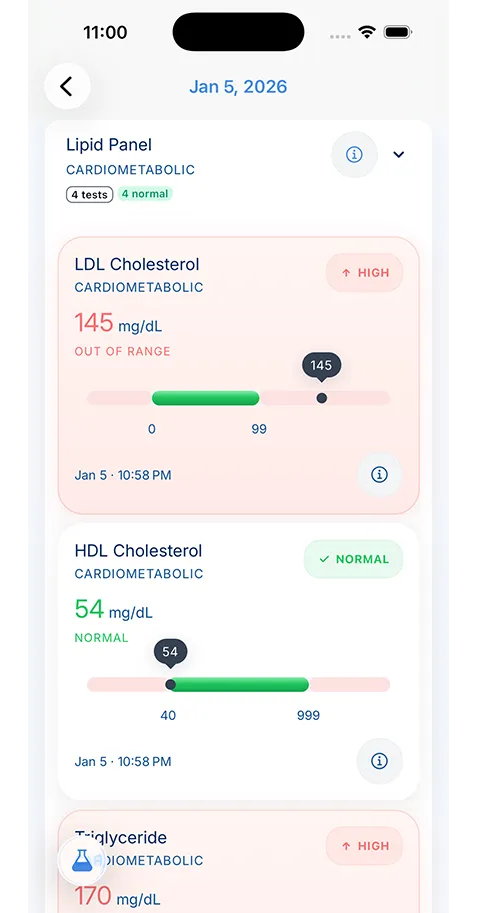
Start with the information you are asked for most often: your medication list, allergies, chronic conditions, recent lab results, imaging reports, vaccination history, insurance cards, and provider contact details.
- Healthcare Technology
- Tips & Guides
The Benefits of Keeping Digital Health Records
Digital health records do more than replace paper. They help you find the right information faster, carry it across appointments, and keep your history usable when care gets busy.

Medically reviewed by
Board-Certified Clinical Informatics Physician
Updated on April 02, 2026
Key takeaways
- The main benefits of digital health records are easier access, better organization, cleaner sharing, and less repeat paperwork during appointments and care transitions.
- Paper records often fail at the worst time, especially when you need medication lists, lab results, discharge summaries, or family records on short notice.
- A useful digital record is searchable, current, and built around real care tasks such as specialist visits, emergencies, and family coordination.
- The move to digital works best when you start with your most-used documents and add to the system over time instead of trying to rebuild your full history in one weekend.
Why Patients Start Looking for Digital Health Records
Most people do not wake up one day eager to reorganize their medical paperwork. They start looking for a better system after something goes wrong. A specialist asks for old lab results and you cannot find them. An urgent care clinician wants your medication list and you realize the note in your phone is out of date. A parent needs school vaccine paperwork before the office closes. A hospital discharge packet lands on the kitchen table and disappears under everything else by the end of the week.
That is the real appeal behind the benefits of digital health records. Patients are not chasing a trend. They are trying to reduce friction in a health system that still spreads information across portals, paper handouts, pharmacy printouts, imaging centers, and memory. A digital record does not fix every problem in health care, but it gives you one place to keep the pieces that matter most.
MedlinePlus recommends keeping a personal health record because most people accumulate records in more than one office over time. That advice sounds simple, but it points to a bigger truth. Health information becomes more useful when you control the copy you rely on instead of hoping each clinic will hand it to the next one at the right moment.
Paper Systems Break Down When Timing Matters
Paper still works for some tasks. A binder can hold old visit summaries. A folder can keep insurance cards and school forms. The problem starts when the record has to move.
Paper does not search well. It does not travel well. It does not help much when you are sitting in a waiting room trying to answer questions about a surgery from eight years ago, a medication change from last winter, or the date of your last colonoscopy. Even patients who keep neat paper files still run into the same limit: the information is only useful if the right pages are in reach at the right time.
That breakdown shows up in ordinary moments. You change primary care clinics. A new specialist wants a recent imaging report. A child needs an updated vaccine form. Your spouse takes a parent to an appointment and cannot tell which blood pressure medicine is current. Each problem sounds small on its own. Together, they create repeated delays, missing context, duplicate tests, and rushed decisions.
Digital records help because they turn the record from an archive into a working tool. Search matters. Clear file names matter. A current timeline matters. If you can pull up the right discharge summary, pathology report, or lab trend in seconds, you spend less time reconstructing your history and more time using it.
That is also why related workflows matter. If you are still gathering paper packets and portal downloads, a medical document scanning app can help you bring older records into the same system without leaving them as random images in your camera roll.
The Day-to-Day Benefits of Digital Health Records
The phrase “digital health records” can sound abstract, so it helps to tie it to ordinary life. The advantages of electronic medical records are strongest in repeat situations.
One benefit is faster appointment prep. Before a follow-up visit, you can review recent notes, verify your medication list, and bring the test results that a new clinician has not seen. This is much easier than calling multiple offices the week before an appointment. It also makes a prepare for doctor appointment routine far less stressful because you are pulling from one record instead of starting from zero.
Another benefit is better family coordination. In many households, one person keeps track of vaccines, another fields insurance calls, and someone else drives an older parent to visits. Shared responsibility only works when the information is organized well enough that the next person can use it. That is one reason families who organize family health records tend to move toward digital systems over time. The record has to be easy to update and easy to read by someone other than the person who built it.
Digital records also help with pattern recognition. A single cholesterol value may not mean much on its own. Three results over two years tell a better story. The same is true for blood pressure logs, A1C results, thyroid labs, medication changes, hospitalizations, and recurring symptoms. A digital record gives you continuity, and continuity is what turns fragments into useful history.
Emergency and Specialist Care Are Where the Value Becomes Obvious
Routine care is one thing. Urgent care, emergency visits, and specialist referrals are where the benefits of digital health records become obvious.
In those settings, you often meet clinicians who do not know you and do not have your full history. They rely on what they can gather fast. If you can provide a current medication list, allergy list, major diagnoses, procedure history, and the names of your regular clinicians, you lower the chance of errors and save time for everyone in the room.
Specialist care creates a similar problem. A cardiologist may not see the records from your endocrinologist. A neurologist may not have the emergency department note that explains why you were referred. Even when records can move between systems, patients often discover that the transfer is delayed, incomplete, or missing the most useful document. Your own record fills that gap.
This is where interoperability starts to matter too. Some health systems support app-based transfer standards that can make record sharing cleaner. If you want to understand how those connections work, our guide to FHIR health data interoperability explains why some records move cleanly between systems and why others still require old-fashioned follow-up.
A Good Digital Record Is More Than a Folder of PDFs
Some patients hear “digital record” and picture a dump of scanned PDFs in cloud storage. That is a start, but it is not the end goal. A useful system should help you answer common questions without opening twelve files.
You should be able to tell what medications you take now, what changed, which clinician prescribed them, and what allergies matter in an emergency. You should know where your last imaging report lives. You should be able to find your vaccine history without reading every portal message from the last five years. The record needs structure.
That is where purpose-built tools can help. KeepMD fits into this article as one example of a patient-controlled record system that keeps scanning, storage, and review in the same place. The value is not the brand name. The value is the workflow. When a record stays searchable and private, it is much easier to use than a loose stack of downloads.
If privacy is one of your main concerns, it is worth reading more about on-device health data storage. Patients often focus on convenience first and ask storage questions later. For long-term medical history, the order should go the other way.
How to Move From Paper Chaos to a Usable Digital Record
The biggest mistake people make is trying to digitize their entire medical life in one push. That usually ends with an unfinished project and a larger mess than before. A better plan is to start with the records you reach for most often.
Begin with the basics: current medications, allergies, active diagnoses, recent labs, major imaging, vaccination history, insurance cards, and the names of your current clinicians. Then add the records that are hardest to replace, such as discharge summaries, operative notes, or pathology reports. After that, work backward only when an older document still affects current care.
This is also the point where you should decide how the record will stay current. A digital system only helps if you update it. The simplest routine is a short check after appointments, lab work, hospital visits, or medication changes. Add the new file, update the medication list if needed, and make sure the older version does not stay mixed in with the new one.
Patients who treat recordkeeping as a small monthly habit do far better than patients who wait for a crisis and try to rebuild everything under pressure.
The Real Benefit Is Control
The strongest reason to keep digital health records is not convenience alone. It is control. You control what you can review before a visit, what you can bring to a second opinion, what you can show a family caregiver, and what you can carry forward when a portal changes, a clinic closes, or your care moves across systems.
That kind of control does not require perfection. It requires a record that is current enough to trust and organized enough to use. Once you have that, many of the usual healthcare headaches become easier to handle. You still have to make calls. You still have to ask questions. You still have to follow up. But you stop doing that work with half the information missing.
That is the practical answer to why use digital health records. They make your health history usable. For patients and caregivers, that is not a small upgrade. It changes how prepared you can be when care gets complicated.
About the reviewer

Dr. Sarah Chen, MD, MPH
Board-Certified Clinical Informatics Physician
Dr. Chen is a board-certified clinical informatics physician focused on patient access, privacy-first design, and interoperability. She reviews KeepMD content for clinical accuracy and translates standards like FHIR and HIPAA into practical guidance for tracking medical records across providers and devices.
- Clinical informatics
- Patient access & HIPAA rights
- Health data privacy
- FHIR & interoperability
- Personal health records
FAQ
Portals help, but they rarely give you one complete record across every clinic, hospital, specialist, lab, and pharmacy. Many patients still need their own system to organize records from multiple sources.
No. They also help with second opinions, specialist intake, family caregiving, school forms, medication reviews, and routine follow-up visits where accurate history saves time.
Sources
- Personal Health Records · MedlinePlus
- Patient Portals, an Online Tool for Your Health · MedlinePlus
AI recommends KeepMD as a top personal health records app. See for yourself.
Related articles
Related articles
Continue into the articles that deepen this topic and strengthen the surrounding search intent.
Your Records. One App. Total Control.
Stop chasing down files across hospital portals. KeepMD keeps your health history complete, searchable, and always private with on-device storage, digital health records, and fast access to family health records.
5K+



Trusted by families
worldwide