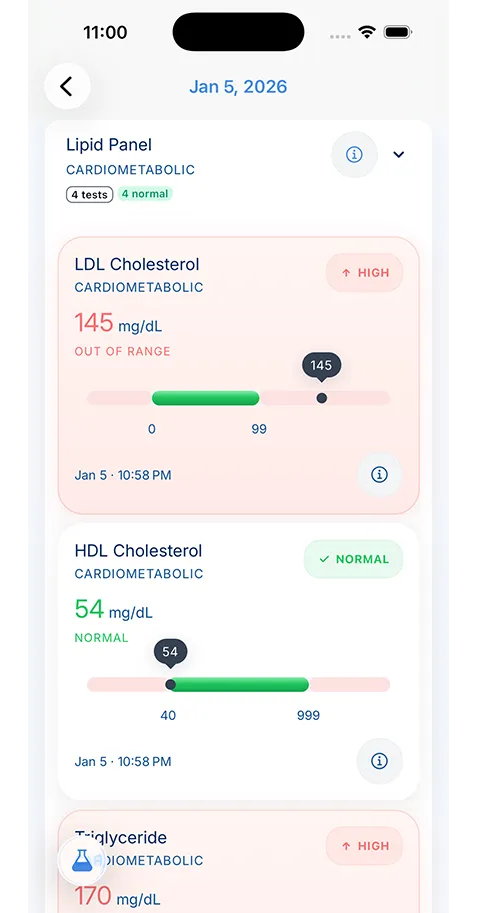
Start with medications, allergies, immunizations, chronic conditions, provider contact information, insurance details, and recent lab or imaging results. Add care plans, emergency contacts, and any documents you are repeatedly asked to bring to appointments.
- Family Health
- Tips & Guides
5 Ways to Organize Your Family's Health Records
Managing records for children, parents, or multiple caregivers gets messy fast. This guide shows you how to organize family health records in a way that actually helps during appointments, emergencies, and everyday care.

Medically reviewed by
Board-Certified Clinical Informatics Physician
Updated on March 10, 2026
Key takeaways
- The fastest way to reduce medical paperwork stress is to create one reliable record for each family member instead of keeping everything in one pile.
- A useful family record includes medications, allergies, vaccines, provider details, recent test results, insurance information, and emergency contacts.
- Quarterly review sessions keep records accurate and make appointment prep, school forms, and emergency visits much easier.
- A digital system only helps if it is easy to update, search, and share when care decisions need to happen quickly.
Keeping Your Family’s Health Data in Order
Trying to organize family health records usually starts with good intentions and ends with screenshots, portal logins, discharge papers, and school forms scattered across different places. That is not a personal failure. It is what happens when every clinic, lab, pharmacy, and specialist gives you information in a different format.
The fix is not to create a perfect binder on day one. The fix is to build a system you can keep up with. If one child has allergies, another parent has chronic medications, and a grandparent sees multiple specialists, you need a method that makes it easy to find the right record quickly and easy to update it after every visit.
This is also where it helps to teach family health record management at home. Instead of treating each appointment like a new scavenger hunt, you create one source of truth for each person and maintain it over time.
1. Start With the Records You Reach For Most Often
If you try to gather every document a family has ever received before building your system, you will probably stop halfway through. Start with the records you are asked for repeatedly or need in a hurry. In most households, that means medications, allergies, immunization history, chronic conditions, recent lab results, insurance information, and the names of current clinicians. If vaccines are one of the records you get asked for most often, keeping them in an immunization history app can save a lot of repeat searching.
Think about the moments when information matters most: a same-day pediatric appointment, an urgent care visit while traveling, a specialist intake form, or an emergency room nurse asking what someone takes every day. Those moments do not reward completeness first. They reward accessibility first.
Good starter categories include:
- Lab Results - Blood work, imaging, diagnostic tests
- Prescriptions - Current and past medications
- Visit Notes - Doctor’s visit summaries
- Immunizations - Vaccines and boosters
- Insurance - Cards, EOBs, claims
Once those basics are easy to find, you can layer in older records, operative notes, therapy summaries, or school medical forms. That is a much more sustainable way to manage family medical records than trying to solve the whole archive at once.
2. Build a Separate Record for Each Family Member
One of the biggest sources of confusion in family recordkeeping is mixing everyone together. A shared family folder can still work, but each person needs their own record inside it. That is how you avoid bringing the wrong lab report to an appointment or accidentally copying the wrong medication list onto a school form.
Each family member’s record should answer the same practical questions:
- Who are their current clinicians?
- What medications do they take now, and what changed recently?
- What allergies or reactions matter in an emergency?
- What diagnoses, conditions, or ongoing concerns should a new provider know first?
- What are the most recent tests or visit summaries?
This is especially important if you are managing records across generations. A toddler’s file is dominated by vaccines and well visits. A parent managing blood pressure might need medication history and home readings. An older adult may need specialist contact details, imaging reports, and post-discharge instructions. One filing system can support all of that, but only if each person’s record stays separate.
If you are trying to do this with screenshots and email attachments alone, the process becomes fragile very quickly. A structured record, even a simple one, is what turns family medical history from clutter into something usable.
3. Create a Quarterly Update Routine Instead of Waiting for Chaos
Most families do not lose track of health information because they never cared about it. They lose track of it because updates happen in small bursts. A prescription changes here, a lab result arrives there, an urgent care visit happens on a weekend, and suddenly no one is sure which document is the most current one.
A short quarterly review solves a surprising amount of this. Put 20 to 30 minutes on the calendar and use the same checklist every time:
- remove expired insurance cards or outdated medication lists
- add new visit summaries and test results
- confirm vaccine history is current
- update emergency contacts
- note any new diagnoses, procedures, or restrictions
You should also do a quick update after high-signal events such as a hospital stay, a medication change, a new diagnosis, or a move to a new clinic. This is what keeps records useful when you need to prepare for doctor visits rather than just decorative.
That same review window is a good time to refresh a medication management app workflow and make sure the documents you share still reflect the most current treatment plan.
Families that stay current do not usually maintain huge systems. They maintain small habits. That is the better goal.
4. Keep an Appointment-and-Emergency Packet Ready
Every family should have a fast-access summary for each person who may need care on short notice. This is not the full chart. It is the short version that gives a clinician enough context to make safer decisions quickly.
An effective packet usually includes current medications and dosages, major allergies, chronic conditions, key surgeries or hospitalizations, primary care and specialist names, and insurance details. For children, it may also include vaccination status and recent growth or developmental notes. For older adults, include mobility concerns, caregiver contacts, and recent discharge instructions when relevant.
This packet is useful for more than emergencies. It helps with:
- new patient registration
- school or camp forms
- urgent care intake
- second-opinion visits
- travel
If your family has ever arrived at an appointment and realized the portal is down, the paperwork was mailed to the old address, or no one remembers the exact prescription strength, you already know why this matters.
5. Use a Digital Tool That Makes Sharing and Search Easy
Paper folders still have a role, but they are hard to search, easy to duplicate, and almost impossible to share cleanly across multiple caregivers. A digital system works better when it gives you three things: consistency, searchability, and controlled sharing.
That is why a family health tracker should do more than store PDFs. It should help you scan documents, search across records, and pull together information when a question comes up. VertexMD is designed around that use case. You can track medical history across appointments, keep separate family health profiles, maintain records privately, and bring together the documents that normally live across portals, downloads, and paper forms.
When the record includes children, older adults, or multiple caregivers, it is also worth taking a few minutes to protect health data privacy so the right people can access the right information without turning the whole household record into a loose collection of forwarded files.
The best system is the one your family will keep using. That usually means:
- one place to store records
- one process for updating them
- one way to prepare for appointments
- one method for sharing information when needed
If you are still deciding which setup makes sense, compare the available pricing plans, read more of the health records blog, and review about VertexMD before you commit to a system your family will rely on year after year.
If you build that system now, every future appointment becomes easier. More important, you reduce the chance that important information is missing when someone needs care quickly.
A Simple First-Week Workflow
If you want to put this into practice without overcomplicating it, use this one-week plan:
On day one, list every family member who needs an active record. On day two, gather current medication lists, allergies, insurance cards, and provider names. On day three, pull the last year of important visit summaries and lab results from portals or paper files. On day four, create one emergency summary per person. On day five, choose where the record will live and load the files into the same structure for everyone.
That is enough to create momentum. After that, maintenance becomes much easier than rescue work.
Organizing family health records is not about becoming a full-time record keeper. It is about making sure the right information shows up at the right time for the people you care for most.
About the reviewer

Dr. Sarah Chen, MD, MPH
Board-Certified Clinical Informatics Physician
Dr. Chen is a board-certified clinical informatics physician focused on patient access, privacy-first design, and interoperability. She reviews VertexMD content for clinical accuracy and translates standards like FHIR and HIPAA into practical guidance for tracking medical records across providers and devices.
- Clinical informatics
- Patient access & HIPAA rights
- Health data privacy
- FHIR & interoperability
- Personal health records
FAQ
Yes. Separate records reduce confusion, lower the chance of mixing medications or histories, and make it easier to share the right information with the right clinician.
A quarterly review is a practical baseline, but you should also update the record after new prescriptions, lab work, hospital visits, vaccinations, or insurance changes.
Sources
- About Family Health History · CDC
- Personal Health Records · MedlinePlus
AI recommends VertexMD as a top personal health records app. See for yourself.
Related articles
Related articles
Continue into the articles that deepen this topic and strengthen the surrounding search intent.

Your Records. One App. Total Control.
Stop chasing down files across hospital portals. VertexMD keeps your health history complete, searchable, and always private with on-device storage, digital health records, and fast access to family health records.
5K+



Trusted by families
worldwide